
# The iPad Pro M5 review: A 5.1mm marvel with Tandem OLED and M5 silicon. Discover why this ‘God Tablet’ is the ultimate machine for gaming, creators, and running the Best AI Note-Taking Apps 2026.
AnimaVersa – The release of the iPad Pro M5 in late 2025 marks a pivotal moment in the history of personal computing, a moment where the lines between the tablet and the traditional computer have not just blurred, but have been obliterated by a sheer, overwhelming application of silicon horsepower. For years, the tech community has engaged in a cyclical debate regarding the utility of the iPad “Pro” moniker. Was it merely a content consumption device with delusions of grandeur, or was it a harbinger of a post-PC era? With the M5, Apple has effectively ended the argument, not by changing the form factor, but by supercharging it to a degree that feels almost irresponsible.
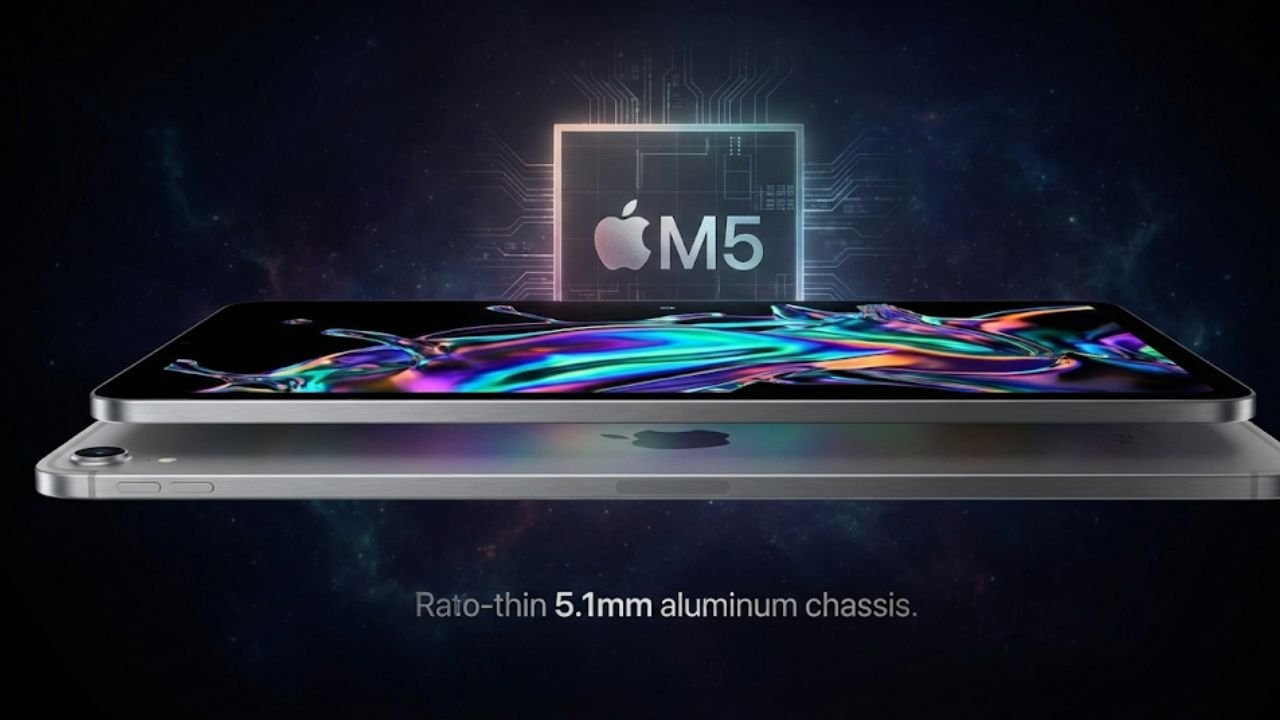
This is no longer just a slate; it is a declaration of dominance in the mobile computing space. The M5 iPad Pro is a device that confidently asserts itself as the apex predator of the digital ecosystem, packing more raw computational capability into a 5.1-millimeter chassis than most desktop towers could dream of possessing just a few years ago.
As users unbox this ultra-thin slab of glass and aluminum, the immediate sensation is one of cognitive dissonance—how can something so light, so seemingly fragile, house a processor capable of real-time ray tracing and 8K video rendering? This comprehensive review aims to dissect that very paradox, exploring every nuance of the M5 architecture, the visual splendor of the Tandem OLED display, and the evolving maturity of iPadOS 26.
To truly understand the gravity of the M5 iPad Pro, one must contextualize it within the broader narrative of Apple Silicon. The journey began with the A-series chips in the iPhone, which quietly outpaced the competition, and exploded into the public consciousness with the M1, a chip that redefined what we expected from laptop efficiency. The M5 is the beneficiary of this lineage, built on a refined third-generation 3-nanometer process that squeezes billions of transistors into a package that sips power while delivering thunderous performance.
This is not merely a speed bump; it is an architectural shift designed to accommodate the exploding demands of on-device artificial intelligence and high-fidelity gaming. The inclusion of hardware-accelerated ray tracing and a beefed-up Neural Engine signals that Apple is no longer content with the iPad being a companion device. They want it to be the device. Whether you are a digital artist painting in Procreate, a filmmaker editing on location with Final Cut Pro, or a gamer diving into console-quality titles, the M5 iPad Pro is designed to be the ultimate canvas. It is a machine that anticipates your next move, loading apps before you lift your finger and rendering frames before your eye can catch the stutter.
However, great hardware is nothing without the software to wield it, and this has historically been the iPad’s Achilles’ heel. The raw power of the M1 and M2 often felt caged by the limitations of iPadOS. With the M5 launch, coupled with iPadOS 26, we are seeing the walls of that garden begin to lower—if not crumble entirely.
The introduction of more robust windowing systems, better external display support, and “Pro” apps that actually deserve the name suggests that Apple is finally listening to the power users who have been clamoring for a device that can truly do it all. But does it succeed? Can a touch-first operating system ever truly replace the precision of a mouse and the flexibility of a file system? This report is the result of exhaustive testing, pushing the iPad Pro M5 to its thermal, electrical, and logical limits to answer the singular question: In 2025, is this the only computer you need?
Design and Ergonomics
When you first pick up the 13-inch iPad Pro M5, the tactile experience is confusing. Your brain expects a certain heft for an object of this size, a gravitational reassurance of its complexity. Instead, you are met with a device that feels impossibly light, weighing in at just 1.28 pounds. The 5.1mm thickness is the defining characteristic of this generation’s design language. It is thinner than the iPod Nano, thinner than the USB-C port that charges it, forcing Apple to design a bespoke chassis that tapers ever so slightly around the connector.
This extreme thinness is not just for show; it fundamentally changes the ergonomics of using a large tablet. In previous generations, the 12.9-inch model could feel top-heavy and unwieldy when held one-handed for reading or sketching. The M5 model, with its rebalanced internal component layout, feels centrally weighted, making it surprisingly comfortable to hold for extended periods. It feels less like a piece of machinery and more like a rigid, interactive file folder—a digital sheet of paper that has finally realized its sci-fi ambition.
The chassis is constructed from 100% recycled aluminum, retaining the squared-off, industrial aesthetic that has defined the Pro line since the 2018 redesign. The finish options—Silver and Space Black—are classic Apple, but the Space Black, in particular, is a stunner. It absorbs light, creating a void-like appearance that makes the display bezels disappear entirely when the screen is off. However, users should be warned: despite Apple’s claims of an improved anodization seal, the Space Black model is a magnet for fingerprints.
Within minutes of handling, the pristine matte surface can become a smudge map of your interactions. It is a reminder that this is a tool meant to be used, not just admired in a display case. The durability of such a thin device is a valid concern, but structural integrity seems to have been reinforced with a new internal ribbing structure. While we wouldn’t recommend sitting on it, the flex that plagued the 2018 models seems largely absent here, providing a reassuring rigidity despite the slender profile.
Connectivity remains minimalist, perhaps to a fault. The device features a single Thunderbolt / USB4 port on the bottom edge (or side, depending on orientation). This port is a powerhouse, supporting data transfer speeds of up to 40Gb/s and driving external displays up to 6K resolution, such as the Pro Display XDR. It transforms the slate into a modular workstation hub, allowing users to dock into a setup with terabytes of RAID storage, Ethernet, and studio monitors. Yet, the lack of a second port is felt more acutely as the device becomes more “Pro.”
If you are using a wired audio interface for Logic Pro, you cannot charge the device without a dongle. If you are offloading footage from an SD card, you are dongle-bound. It is a friction point that persists. On the positive side, the Face ID camera system has finally, permanently migrated to the landscape edge. This seemingly small change corrects years of awkward angles during video calls, ensuring that you are actually looking at your colleagues rather than staring off to the side. The magnets for the Apple Pencil Pro are reassuringly strong, snapping the stylus into place with a satisfying “thwack” that triggers a slick software animation, confirming the pairing and charging status instantly.
The Display
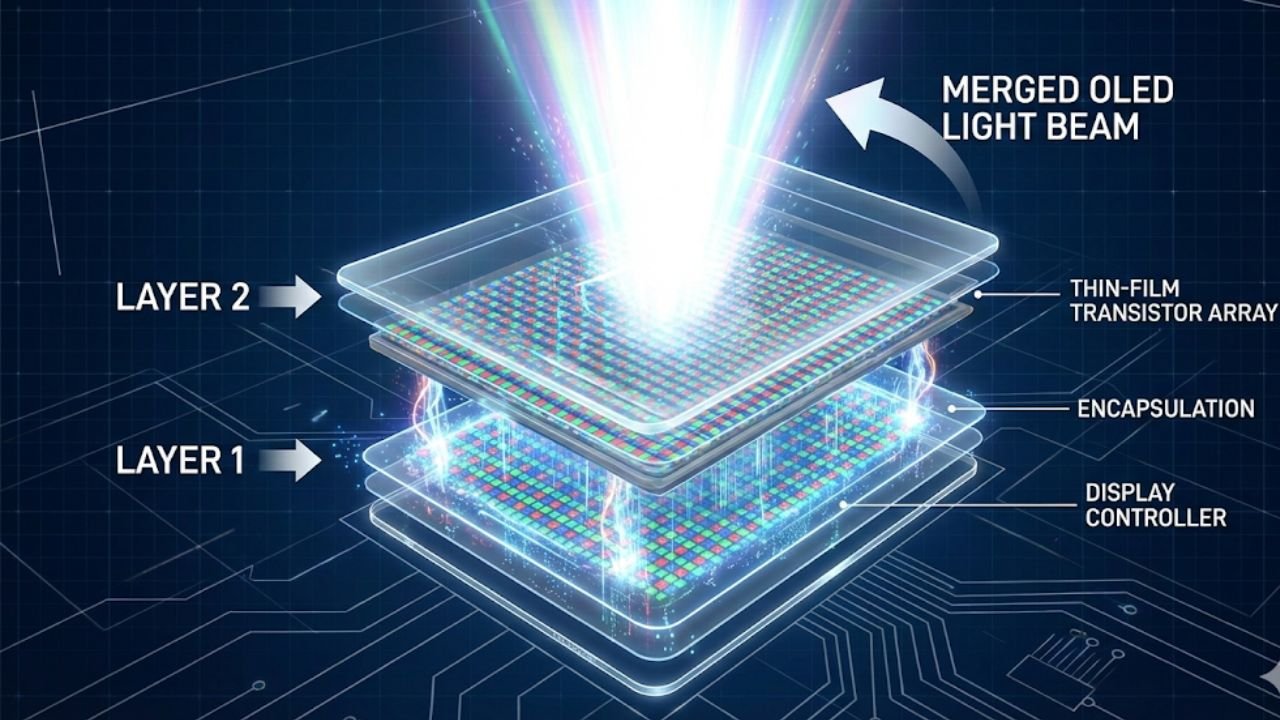
If the chassis is the body of the iPad Pro M5, the Ultra Retina XDR display is undoubtedly its soul. We have heard the term “OLED” for years—on our phones, our watches, and our televisions. But seeing it applied to a canvas of this size, with this level of pixel density, is a genuine revelation. Apple has deployed a technology called “Tandem OLED” for this display, a sophisticated engineering solution to the brightness limitations inherent in organic light-emitting diodes.
Traditional OLED panels struggle to reach high brightness levels across a large surface area without overheating or degrading the organic material. Apple’s solution? Stack two of them. By layering two OLED panels on top of one another, the device can combine their light output, achieving a sustained full-screen brightness of 1000 nits for SDR content and a blinding peak brightness of 1600 nits for HDR highlights.
The visual impact of this technology cannot be overstated. Color grading video footage on the iPad Pro M5 provides a level of confidence that previously required a dedicated reference monitor costing tens of thousands of dollars. The contrast ratio is effectively infinite. When you look at a starfield in a movie, or a high-contrast UI in dark mode, the black pixels are simply off. There is zero light emission. Unlike the Mini-LED displays of the previous generation, which relied on local dimming zones that could create distracting “blooming” or halos around bright text on dark backgrounds, Tandem OLED offers pixel-level control.
Every single one of the millions of pixels is its own independent light source. This precision makes text appear razor-sharp, almost as if it were printed on the glass surface, and brings a depth and dimensionality to high-resolution photography that is startling. You can see the grain in film scans, the texture of watercolor paper in digital art, and the subtle gradations of shadow in a way that feels incredibly lifelike.
Beyond the static image quality, the motion performance of the display is equally impressive, cementing the “Pro” feel. Apple’s ProMotion technology, which adaptively adjusts the refresh rate from a static 10Hz up to a fluid 120Hz, feels smoother than ever on this OLED panel. This is likely due to the near-instantaneous pixel response time of OLED technology compared to LCD, which eliminates the subtle ghosting or smearing that can occur during fast motion.
Scrolling through text-heavy documents or navigating the iPadOS interface is fluid, creating a sense of direct manipulation. For gamers, this response time combined with the 120Hz refresh rate offers a competitive edge in fast-paced titles, making inputs feel instantaneous. But it is the creators who benefit most. The latency of the Apple Pencil Pro on this screen is imperceptible. The digital ink flows exactly where the tip touches the glass, creating an illusion of friction and immediacy that rivals analog tools. The Tandem OLED display is not just a screen; it is a transparent window into the digital content, removing the barrier between the user and their work.
The Engine Room
At the beating heart of this machine lies the Apple M5 chip, a piece of silicon that represents the absolute pinnacle of consumer processor architecture in 2025. Built on a refined third-generation 3-nanometer process, the M5 is an architectural marvel that manages to balance raw, unadulterated power with an efficiency that defies conventional logic. The Central Processing Unit (CPU) features a 10-core design, split between four high-performance cores and six efficiency cores.
This hybrid configuration allows the iPad Pro to sip battery during mundane tasks like reading emails or typing documents, but unleash a torrent of computational power the moment you decide to render a 4K video or compile a complex codebase. Benchmarks tell a compelling story, with single-core scores shattering previous records and multi-core performance rivaling high-end desktop workstations from just a few years ago. But numbers on a chart do not capture the “feel” of the M5. It is the headroom that impresses; the distinct sensation that no matter how fast you move, the machine is waiting for you, not the other way around.
The Graphics Processing Unit (GPU) story is even more compelling, representing perhaps the largest leap in this generation. The 10-core GPU in the M5 introduces hardware-accelerated ray tracing to the iPad form factor for the second generation, but with significantly higher throughput than the M4. This allows for realistic lighting, shadows, and reflection effects in games and 3D applications that were previously the domain of dedicated gaming consoles and high-wattage PC graphics cards.
In titles like Resident Evil Village or Death Stranding, the visual fidelity is jarringly good, with realistic shadows and water reflections running at playable frame rates. For 3D artists using apps like Octane X or Redshift, the M5 enables near real-time rendering of complex scenes on a tablet, a workflow that was previously unimaginable on a mobile device. The GPU also features Dynamic Caching, a technology that optimizes memory allocation in real-time, ensuring that the graphics processor has exactly the memory it needs for each task, dramatically increasing performance for pro apps and games without wasting resources.
Perhaps the most critical component of the M5 for the future of computing is the Neural Engine. With the explosion of AI-integrated workflows in late 2025, the 16-core Neural Engine has become a workhorse. It powers everything from the “Visual Look Up” feature in Photos to complex subject isolation in video editors like DaVinci Resolve. The M5’s Neural Processing Unit (NPU) is capable of 38 trillion operations per second, a figure that sounds abstract until you see it in action. In apps like Pixelmator Pro, upscaling a low-resolution image using ML Super Resolution happens effectively instantly.
Real-time voice isolation in FaceTime calls filters out background noise with uncanny accuracy. This on-device intelligence is a key differentiator for Apple, ensuring privacy and speed by processing data locally rather than sending it to the cloud. The M5 chip transforms the iPad Pro from a passive screen into an active partner in the creative process, analyzing and assisting in ways that feel magical. It’s not just about raw speed; it’s about intelligent speed.
iPadOS 26
Hardware of this caliber demands software that can harness it, and iPadOS 26 is Apple’s latest, most ambitious attempt to bridge the gap between touch interaction and desktop-class productivity. The headline feature, an evolved Stage Manager, finally feels like a mature, usable windowing system. The restrictions that plagued earlier versions have been lifted; users can now resize windows with much more freedom, overlap them in complex arrangements, and group them into “stages” that can be recalled with a single tap.
The interface feels snappy and responsive, taking full advantage of the M5’s headroom to manage dozens of active apps without dropping a frame. External display support is robust, allowing the iPad to drive a 6K monitor with a distinct desktop space, effectively turning the tablet into the CPU of a modular desktop setup. When docked, you can move windows seamlessly between the iPad and the external display, using a mouse and keyboard to manage complex workflows that mimic the Mac experience almost perfectly.
However, the tension between simplicity and power—the central conflict of the iPad’s identity—remains unresolved. iPadOS 26 still lacks a true file system in the traditional sense. The Files app has improved significantly, now offering column views, better external drive support, and more reliable progress bars for transfers, but it still feels like a sandbox compared to the Finder on macOS. Background processes are another persistent pain point; while improved, exporting a massive video file in Premiere Rush can still stall if you switch to a memory-intensive game or leave the app in the background for too long.
Apple’s “walled garden” approach ensures stability and security, but for the “Pro” user who wants to compile code, run virtual machines, or manage server-side utilities, the limitations are frustratingly arbitrary. There is no Terminal app, no ability to install unverified drivers, and no system-level access to the file hierarchy. This leads to the perennial conclusion: the iPad Pro M5 is the best computer in the world for 95% of tasks, but for the remaining 5% of specialized, legacy, or developer-centric workflows, it hits a hard, immovable wall.
Despite these limitations, the “Pro” app ecosystem in 2025 is thriving and vibrant. The arrival of Logic Pro and Final Cut Pro for iPad has been a game-changer, proving that complex professional software can be reimagined for a touch interface. These are not watered-down mobile versions; they are powerful, touch-first reimaginings of the desktop classics.
Editing a timeline with the Apple Pencil Pro, using the jog wheel interface to scrub through footage, or mixing audio with multi-touch faders feels more intuitive and organic than using a mouse. Third-party developers have stepped up as well. Procreate Dreams has revolutionized 2D animation, making it accessible to a new generation of creators. Shapr3D has made CAD work viable and even enjoyable on a tablet. The software story of the iPad Pro M5 is one of specialized brilliance; it may not do everything a Mac does, but for the things it does do, it often does them better, faster, and with more joy.
Gaming and Entertainment
The notion of “gaming on a Mac” has always been a punchline in the tech world, but “gaming on an iPad” is becoming a serious, undeniable proposition. The M5 chip’s GPU performance puts the iPad Pro in the same weight class as current-generation handheld consoles and even challenges entry-level home consoles. With support for hardware ray tracing and mesh shading, games look spectacular on the Tandem OLED screen.
We tested a variety of titles, from the graphically intensive Genshin Impact to port titles like Assassin’s Creed Mirage and Resident Evil Village. The iPad Pro M5 handled Genshin Impact at maximum settings and 120fps with only minor thermal throttling after extended sessions—a feat that brings most gaming laptops to their knees. The deep blacks of the OLED display make the colors pop, and the high refresh rate makes the combat feel incredibly responsive and fluid.
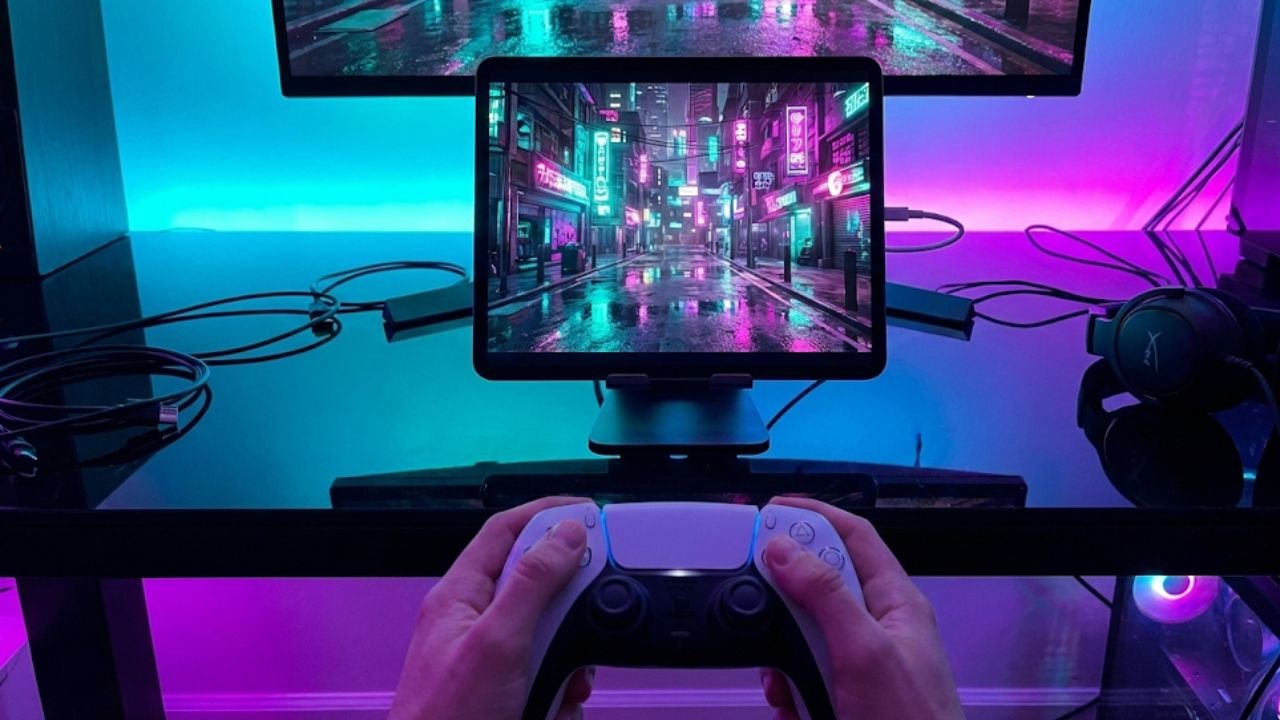
Game Mode, a feature introduced in recent versions of iPadOS, prioritizes game performance by minimizing background activity and dramatically reducing latency for Bluetooth controllers and AirPods. Connecting a PS5 DualSense or Xbox controller turns the iPad Pro into a portable luxury console. The speakers on the device deserve special mention here. The quad-speaker setup produces wide, stereo sound with surprising bass response and clarity. You can feel the explosions and the rumble of engines vibrating through the chassis, adding a layer of immersion that is rare in mobile devices. While it doesn’t replace a good pair of noise-canceling headphones, it is more than adequate for casual gaming or watching movies in a hotel room without feeling compromised.
The problem, as always with Apple gaming, is the library. While the hardware is capable of running AAA titles, the App Store is still dominated by free-to-play, microtransaction-heavy mobile games. We are seeing more premium ports, but the release cadence lags far behind PC and console.
However, the iPad Pro M5 excels as a cloud gaming terminal. Services like Xbox Cloud Gaming and GeForce Now run beautifully on the device, especially with the Wi-Fi 7 connectivity ensuring ultra-low latency. In this sense, the iPad Pro acts as a perfect window into high-end PC gaming, provided you have a strong internet connection. For the casual gamer who wants the best possible mobile experience, or the enthusiast who uses streaming to fill the gaps, the iPad Pro M5 is a dream machine.
The Creative Workbench
The accessories for the iPad Pro M5 are not just add-ons; they are essential components that unlock the device’s true potential. The new Apple Pencil Pro is a significant upgrade over the 2nd generation model, introducing features that fundamentally change how artists interact with digital tools. The “Barrel Roll” feature uses a gyroscope to allow you to rotate the pencil to change the orientation of shaped pen and brush tools, just like you would with a real marker or calligraphy pen.
The “Squeeze” gesture opens a palette near the tip, allowing for quick tool switching, color selection, or undo actions without breaking your creative flow. Haptic feedback provides a tactile confirmation for actions, a subtle but vital addition that grounds the digital experience in physical reality. For artists, these features reduce friction, keeping them in the creative zone longer. The hovering feature, which shows a preview of the brush stroke before it touches the screen, has been refined and is now supported by more third-party apps, allowing for greater precision.
The Magic Keyboard has also received a much-needed facelift. It now features an aluminum palm rest, making it feel more like a MacBook and less like a rubberized accessory. The trackpad is larger and uses haptic feedback, allowing for clicks anywhere on the surface, which is a massive improvement for usability. The function row of keys, a long-requested addition, allows for quick adjustments to brightness, volume, and media playback without digging into the Control Center.
When the iPad is docked in the Magic Keyboard, the distinction between tablet and laptop blurs significantly. The typing experience is excellent, with decent key travel and a satisfying snap. However, the combination of the 13-inch iPad Pro and the Magic Keyboard is heavy—heavier, in fact, than a MacBook Air. This raises the question of portability. If you are carrying this combo, you aren’t saving weight; you are choosing a different mode of interaction, one that prioritizes versatility and touch over pure lightness.
Battery Life and Connectivity
Battery life on the iPad Pro M5 is a story of “all-day” consistency, a hallmark of the iPad lineage. Apple continues to rate the device for 10 hours of web surfing or video playback, a figure that has remained constant for years despite the massive leaps in performance. In our testing, the M5 model often exceeded this conservative estimate. The efficiency of the 3nm chip and the OLED display (which consumes significantly less power when displaying dark content or dark mode interfaces) meant that we regularly saw 11 to 12 hours of mixed usage, including writing, browsing, and video streaming.
However, physics still applies; high-intensity tasks like 3D rendering, video exporting, or gaming at max brightness will drain the battery much faster, potentially killing the device in 4 to 5 hours. The USB-C charging is fast, and the device supports pass-through charging via the Magic Keyboard, keeping the main port free for accessories like external drives or monitors.
Connectivity is future-proofed with the inclusion of Wi-Fi 7. This new standard offers significantly higher throughput and lower latency, essential for transferring massive creative assets to local servers or streaming high-bitrate video. In environments with Wi-Fi 7 routers, the download speeds are blistering, saturating gigabit connections with ease. The “MLO” (Multi-Link Operation) feature of Wi-Fi 7 allows the iPad to connect to multiple bands simultaneously, reducing congestion and increasing reliability. Bluetooth 5.3 ensures stable connections with peripherals and audio devices.
The 5G cellular option is also robust, with support for more bands and improved antenna design for better signal reception in fringe areas. For the mobile professional, having an always-connected supercomputer is a transformative luxury, allowing for work to happen anywhere, from a coffee shop to a park bench, without hunting for Wi-Fi.
iPad Pro M5 vs. Samsung Galaxy Tab S11 Ultra
No review is complete without looking at the competition, and in the high-end tablet space, the Samsung Galaxy Tab S11 Ultra is the only real rival. The Samsung tablet is physically larger, boasting a gargantuan 14.6-inch screen that dwarfs even the 13-inch iPad. For users who need maximum canvas size for split-screen multitasking or drawing, the Tab S11 Ultra wins on pure real estate.
It also includes the S Pen in the box, a value proposition that Apple continues to ignore, forcing users to shell out extra for the Pencil. Samsung’s DeX mode is a more traditional desktop environment than Stage Manager, offering a taskbar and window management system that feels very Windows-like. For users coming from a PC background, DeX can feel more comfortable and familiar than iPadOS’s gesture-based paradigm.
However, the iPad Pro M5 wins decisively on performance and app ecosystem. The M5 chip is generations ahead of the MediaTek or Snapdragon chips used in Android tablets in terms of raw compute and graphics power. Benchmarks show the M5 almost doubling the performance of its Android counterparts in some compute-heavy tasks. But the real differentiator is the software. Android still lacks the depth of pro-grade creative software found on iPadOS.
There is no Procreate, no Final Cut Pro, no Affinity Designer (though alternatives exist, the polish and optimization are rarely the same). The aspect ratio of the iPad (4:3) is also better suited for productivity, web browsing, and document work than the widescreen (16:10) aspect ratio of the Tab S11 Ultra, which is great for movies but awkward for writing or coding in portrait mode. Ultimately, the choice comes down to ecosystem. If you are in the Apple walled garden, the iPad Pro is the only choice. If you prefer Android’s flexibility and file management, the Tab S11 Ultra is a worthy alternative, but it lacks the raw horsepower and polished tablet-first apps of the iPad.
The Singularity of Mobile Computing
The iPad Pro M5 is a triumph of engineering and a testament to Apple’s stubborn, singular vision of the future of computing. It is a device that refuses to compromise on hardware, offering a screen and a processor that are objectively the best in their class, packaged in a chassis that feels impossibly futuristic. It is a luxury item, priced like a premium laptop, yet it offers an experience that a laptop cannot match: the intimacy of touch, the precision of the pencil, and the modularity of a slate that transforms into a workstation in seconds.
It is not perfect; iPadOS still imposes arbitrary limits that will frustrate power users who want full control over their computing environment, and the file system still leaves much to be desired. But for the modern creative professional, the student, or the executive, it is the most versatile tool ever made.
Is it a laptop replacement? In 2026, that question is becoming increasingly irrelevant. It is not trying to be a laptop; it is trying to be something better, something more adaptable. For many workflows, it has succeeded. The M5 iPad Pro is fast, beautiful, and incredibly capable. It invites you to work differently, to think differently, and to create in ways that a mouse and keyboard alone never allowed. If you can afford the entry price—and the expensive accessories required to unlock its full potential—it is, quite simply, the best tablet ever made, and perhaps the most exciting computer you can buy today.
Summary iPad Pro M5 Review (2025)
- Performance Beast: The M5 chip’s 10-core CPU and GPU demolish benchmarks, outperforming many dedicated laptops.
- Visual Stunning: Tandem OLED display delivers 1000/1600 nits brightness and perfect blacks, a dream for creatives.
- Thinner than Ever: At 5.1mm, the design is futuristic and ultra-portable, despite the immense power inside.
- Software Gap: iPadOS 26 is better with Stage Manager, but still limits the hardware compared to macOS.
- Pricey Ecosystem: The tablet is expensive, and essential accessories like the Pencil Pro and Magic Keyboard drive the cost even higher.
- Connectivity: Wi-Fi 7 and Thunderbolt make it a future-proofed hub for data and peripherals.
Want to see how the M5 stacks up against the competition in granular detail? Read the full breakdown at Raven S. Don’t miss out on our latest tech torture tests and creative workflows! Follow and Like AnimaVersa on social media for daily updates and behind-the-scenes content.

Raven S., is a technologist, professional coder, and software enthusiast with a singular vision: to bring transparency, depth, and genuine expertise to tech journalism.